
Shipped
Add a menu from a file
Bring in the menu you already have as a PDF, a document or a spreadsheet. Every item comes back with its prices and recipe to check before it is added.
October 4, 2026 · 1.39.0
What was asked for
Setting up the menu meant typing it in item by item, although almost every business already has its menu in a file, from a designer's PDF to the spreadsheet the prices are kept in. The ask was for the assistant to read that file and set the menu up from it, the way Bulk add on the Items page sets up stock from a list.
How a menu is read
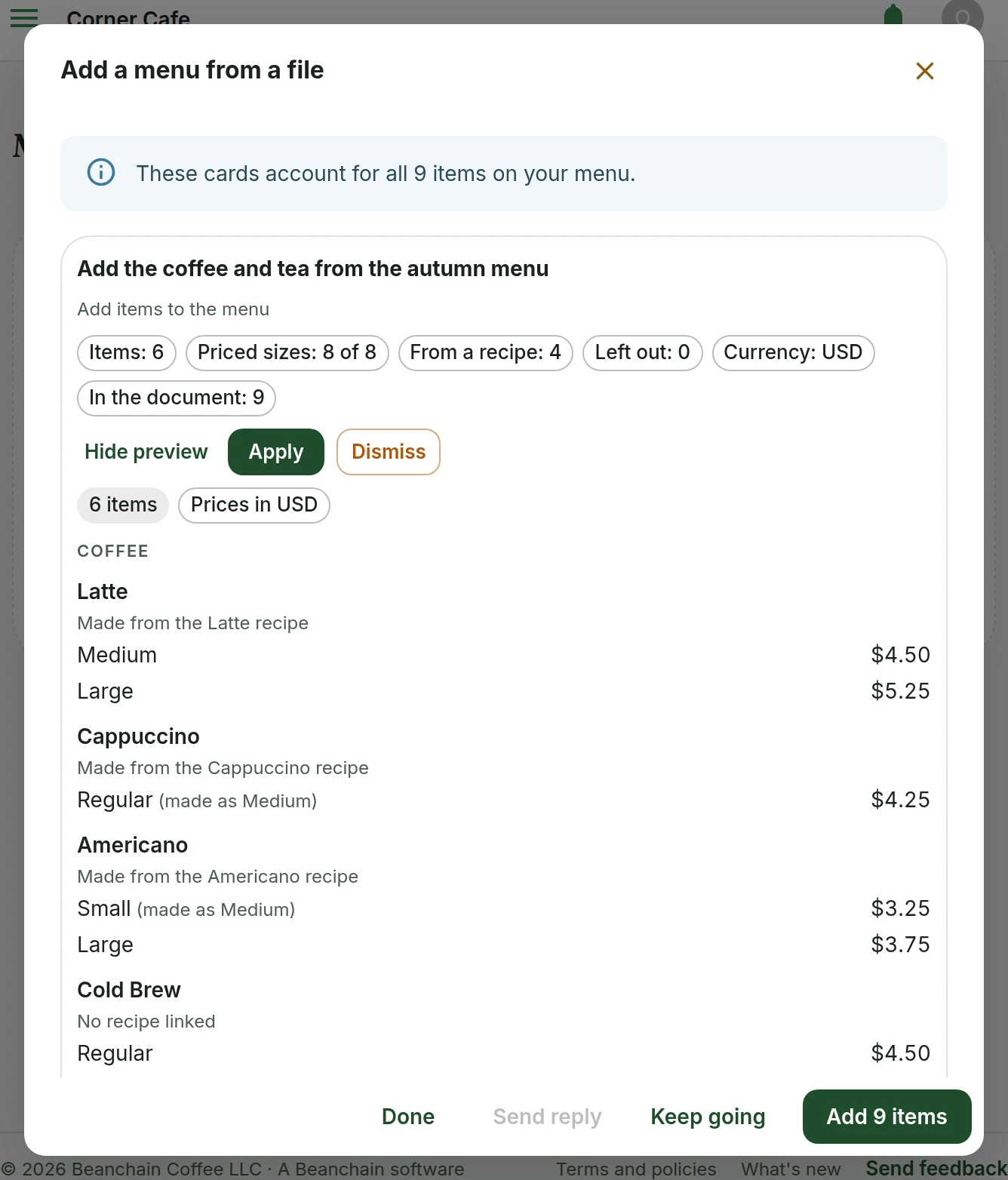
On Menu items, Add to the menu now has From a file, and so does a menu with nothing on it yet. Choose the file and, if it helps, add a note such as "Prices include tax" or which cup a Small is. The assistant reads the whole file and proposes the menu as cards.
Each card lists its items under the sections your menu uses, with the price of every size and the recipe the item is made from, matched by name. Where the menu calls a size Small and the recipe calls it Medium, the card says the size is made as Medium. A line above the cards says whether they account for every item on your menu, and Keep going reads the rest of a long one.
Checking the cards
Nothing is added until you add it. A card names anything it left out and why: an item already on the menu, one you took off it, or one the menu lists twice. It says which currency the prices are saved in, and warns when the document's prices look like another currency, because nothing is converted. Then one button adds every card in order, and it says how many items it will add, such as Add 9 items.
Undoing an import
An added card stays in the dialog with an Undo, which asks first and then deletes the items that card added, along with any changes made to them since. Open the dialog again later and your last import is there, so a card added by mistake can still be undone and one you left can still be added.
What else changed
Bulk add on the Items page read only the first sixteen lines of a stock list typed into a Word document or pasted in, so a longer list came back short. It reads the whole list now. When a spreadsheet has more sheets than can be read, the assistant is now told which ones were skipped, so it can tell you. Photos of a printed menu are not read yet, and they come next. Adding a menu from a file is for owners and admins.
What people asked for
- Asked for the assistant to set the menu up from a document, the way Bulk add sets up stock.
Standards and recipesAssistantInventory
Tell us what to fix next
Everything on this page started with somebody saying something was awkward. Questions count, and so does telling us a thing is harder than it should be.