
Shipped
Add a unit the same way everywhere
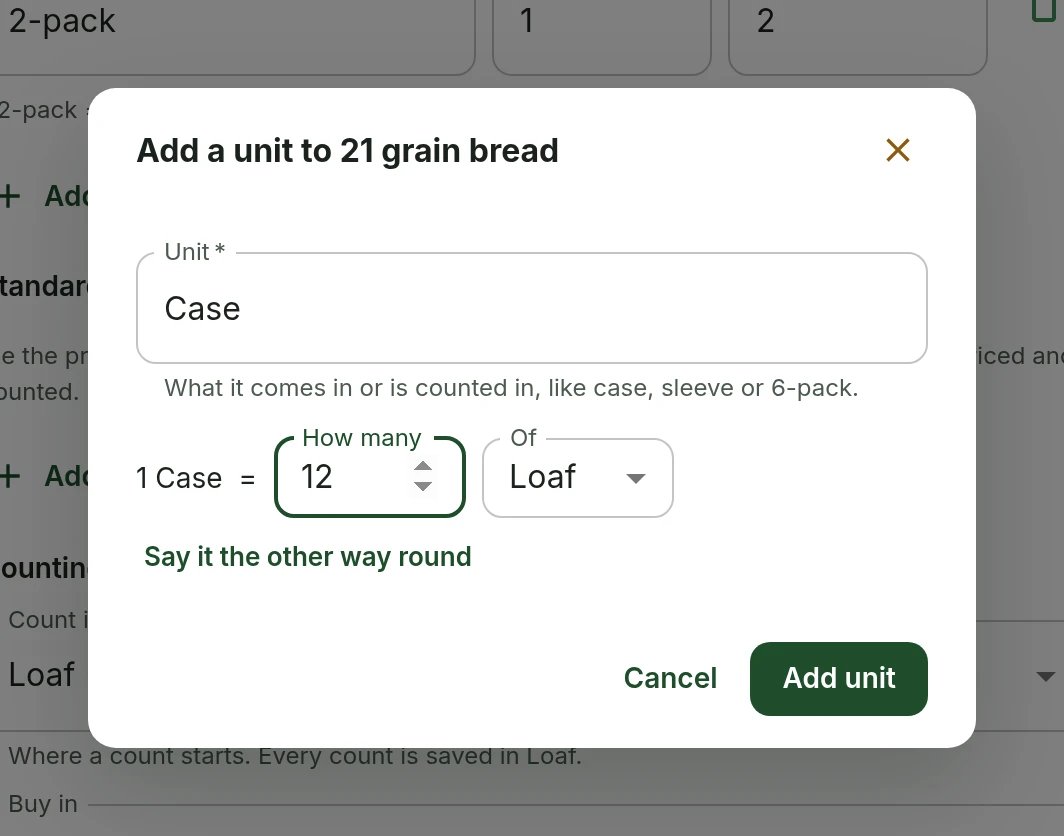
Making a new unit, such as a case or a sleeve, now works the same on every page that needs one. Say it the way you would, like 1 Case = 6 Bottle.
October 3, 2026 · 1.37.1
What was asked for
Recipes have had a small dialog for adding a unit to an item since recipe costs arrived on 1 October: 1 Case = 48 buns, or 1 fl oz = 4 pumps, said against any unit the item already has. The shopping list, supplier prices, invoice review and the Items page each kept an older form of their own, which only asked how many of the item's main unit the new one held. The ask was to use the recipe dialog everywhere a unit is made.
How adding a unit works
Pick New unit from a unit list, type the unit's name, and say how it compares with a unit the item already has. The shopping list, supplier prices and invoices put the new unit first, because that is how stock is bought: 1 Case = 6 Bottle. A recipe puts it second, because a recipe uses less than the item comes in: 1 Bottle = 64 pumps. Either sentence turns round with one tap when it reads the other way.
Type a weight or a volume, such as lb or fl oz, and the item gets a size instead, which brings every unit of that kind at once. On an invoice or receipt line, the new unit starts from the unit the line printed, such as 6PK, so there is usually nothing to type but the number.
Where you will find it
The same dialog opens from each of these, and what you add is saved on the item for all of them.
- Logging what you got, or a new price, on the shopping list
- A supplier's price and its Buy in unit on the Items page
- Edit units on the Items page, saved together with the rest of the sheet
- Invoice and receipt review
- The waste log and the resource streams
- Recipes and the menu, as before
What else was fixed
Only owners and admins can save a unit, and New unit is now offered only to them. Some lists showed it to everyone and then refused to save. Making a unit also no longer sends the rest of the item back, so a name or supplier changed elsewhere in the meantime stays as it was changed.
A unit made from Update price on the shopping list now stays chosen, and so does the price typed before it. Until now the old unit came back and the price was emptied, so a case price could be saved as the price of one pack. A unit's number also counts as part of its name now, so a 6-pack is no longer taken for the 2-pack an item already has.
What people asked for
- Asked for the recipe editor's way of adding a unit to be used everywhere units are made, such as items and the shopping list.
InventorySuppliers and invoicesStandards and recipesSustainability
Tell us what to fix next
Everything on this page started with somebody saying something was awkward. Questions count, and so does telling us a thing is harder than it should be.