
Shipped
Every item on one page, edited a card at a time
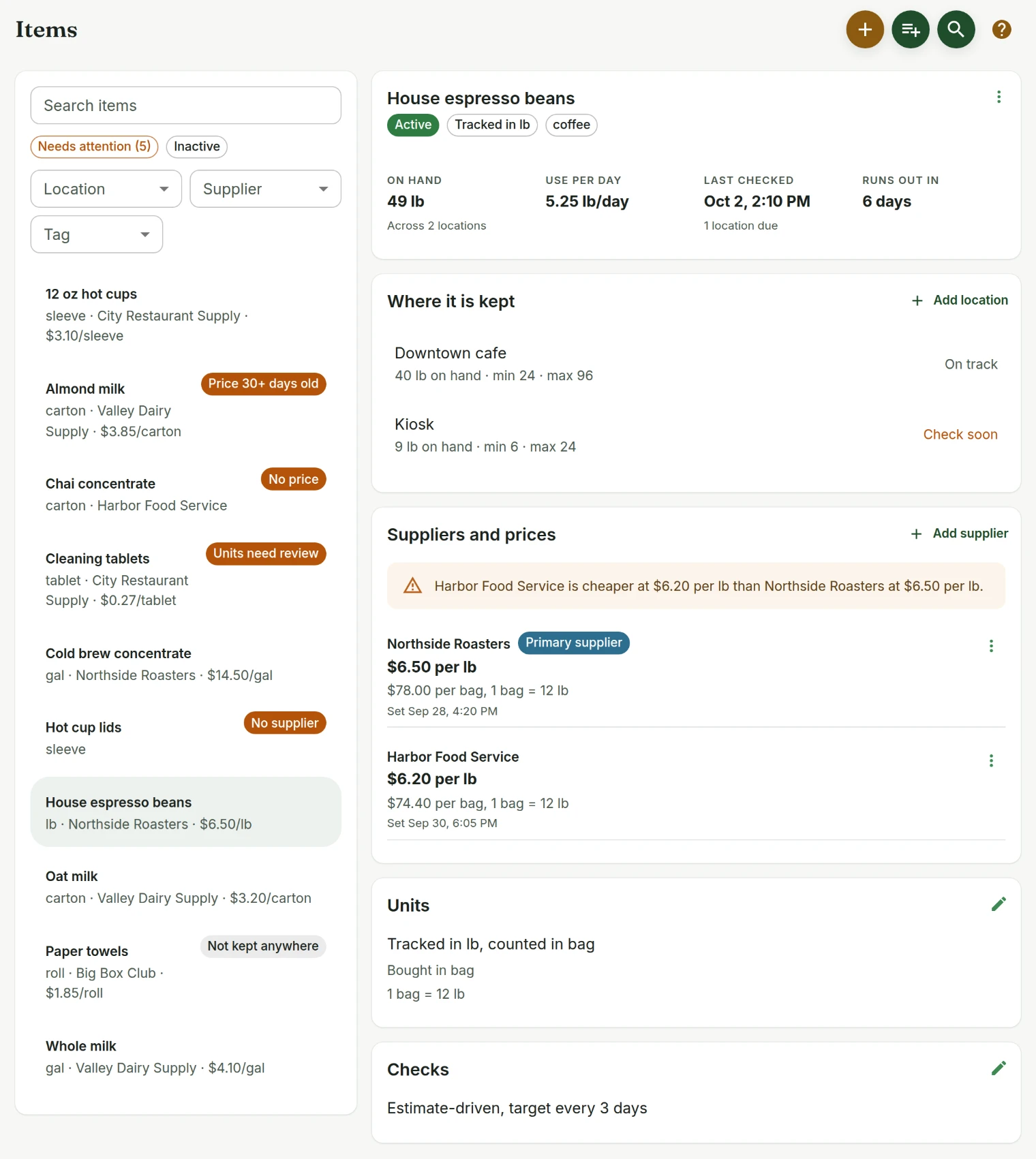
The Items page is a list on the left and one item on the right, with five cards you edit separately instead of one long form in a dialog.
September 3, 2026 · 1.6.0
One long form for everything
Changing a price meant finding an Edit control in a card menu, opening a dialog that held every field an item has, and scrolling it. On a phone that is most of the work of keeping inventory current, and it is why prices went stale.
Five cards, one sheet each
An item is now At a glance, Where it is kept, Suppliers and prices, Units, and Checks. Each card has its own Edit and its own short sheet: full screen on a phone, a centred dialog on a desktop, Save disabled until something actually changes, and a prompt if you close with unsaved work.
- The list says what is wrong with each row rather than making you open it. Units need review, no supplier, no price, price 30 days old, not kept anywhere.
- Filter to Needs attention and work down the list.
- Prices are compared in the unit you count in, so $78.00 per bag reads $6.50 per pound underneath as you type, and the card says when your primary supplier is not the cheapest.
Inventory
Tell us what to fix next
Everything on this page started with somebody saying something was awkward. Questions count, and so does telling us a thing is harder than it should be.