
Shipped
Add a menu from photos
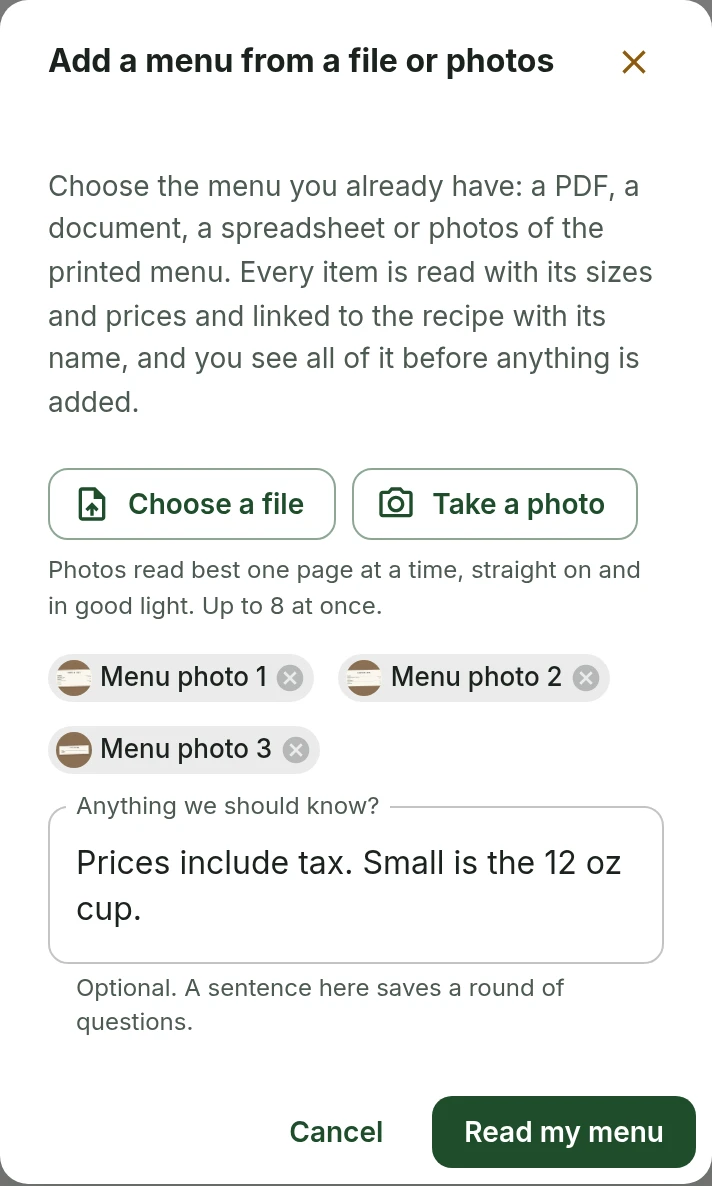
Take photos of your printed menu, or choose them on your phone, and every item comes back with its prices and recipe to check before it is added.
October 4, 2026 · 1.40.0
Why photos
Adding a menu from a file reads a PDF, a document or a spreadsheet. Plenty of businesses have none of those: the menu is the printed card on the counter or the board above it. Now the menu can be brought in from photos of it.
How photos are read
On Menu items, Add to the menu has From a file or photos. Choose a file now takes photos, iPhone photos included, and Take a photo opens the camera on a phone. Up to eight photos go in one import, and files can go with them. Each photo is turned the right way up, made smaller and stripped of the location your phone saved in it before it leaves the phone.
Read my menu reads every photo once, which takes about twenty seconds, and saves what was read beside the photos in the Library. The assistant then works from that, so asking it to keep going reads exactly the same words, and the menu comes back as the same cards a file gives.
When a photo cannot be read
If a photo could not be read, is not a menu or had nothing readable on it, the import stops before the assistant starts and says what each photo gave. Read again tries the ones that failed, and Continue with what was read goes on without them. To replace a photo, remove it and take it again. Blur or an edge cut off never stops anything: what could not be read is listed above the cards.
Checking the cards
Prices are read exactly as printed and never worked out. A price that could not be read is left off its item, and the assistant names it. An item caught at the edge of two photos is still one item. The line above the cards counts what is in your photos rather than claiming the whole menu, because a photo shows only what was photographed.
What else changed
The assistant could read a photo chosen from the Library as though it were text, which gave it pages of nonsense to work from. Photos and other files that are not text are now turned away with a note saying why. Adding a menu from photos is for owners and admins.
Standards and recipesAssistant
Tell us what to fix next
Everything on this page started with somebody saying something was awkward. Questions count, and so does telling us a thing is harder than it should be.