
Shipped
Shopping trips, receipts and the keyboard
The shopping list no longer shows an old copy, and it flags what might be low. A trip with a receipt saves in a few seconds, and counting from the keyboard is quicker.
October 22, 2026 · 1.66.0
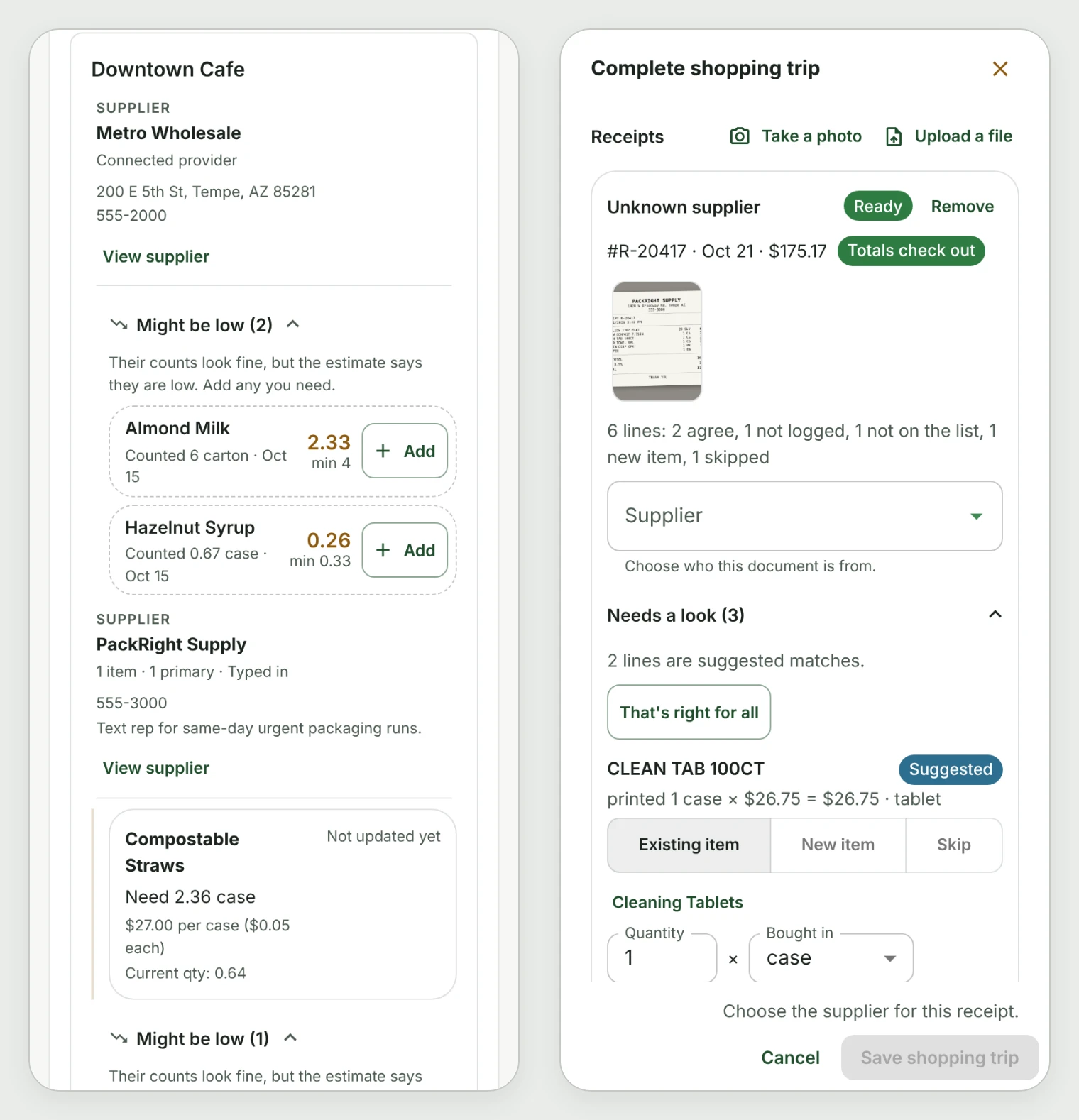
What went wrong on a shopping trip
On a supply run in October, the shopping list on the phone left out items that had been counted below their minimum half an hour before. Picking today's date brought them back. Adding the receipt took about fifteen seconds to read, and saving the trip was slow and often ended in an error. In an inventory check, the keyboard covered Save, so it had to be closed to save each count.
The shopping list
The list on that phone was a copy the app had saved the day before. When the latest list took more than four seconds to arrive, which in a store with weak signal is often, the app showed its saved copy without saying so. It now waits for the latest list and uses the saved copy only when the phone is offline. Opening the app reads the list fresh as well, so a count saved a minute ago is on it.
The list also says how current it is. While it refreshes it says Checking for new counts. A list more than five minutes old, such as the offline copy, says when it is from and that counts saved since are not on it, with a Refresh button. A list that could not be loaded says so and offers Try again, where it used to say there was nothing to buy. The estimates, the economics pages and an item's details no longer show old numbers on a slow connection either.
Might be low
With the date left blank, the list goes by the latest counts. That misses an item whose count looks fine but whose use since then says it is running low, like the milk on that trip. A supplier with such items now ends with Might be low: each item's last count, the day it was taken, and its estimate against its minimum. Add puts one on the list with the amount that brings it back to its par level, or to its minimum when it has no par. The section starts open, and tapping its heading folds it away. Ask the assistant what else might be running low and it lists the same items.
Picking a date
A picked date now means that day where the location is. Today's date plans for right now, where in Arizona it used to plan for 5 pm the day before, and a later date plans that many days ahead. The date field says what a blank date and a picked one each use.
Counting from the keyboard
In an inventory check, the keyboard's Next key now saves the count and opens the next item with the keyboard still up. On the last item the same key saves the count. The estimate is selected when a count opens, so the first digit you type replaces it. In Log shopping item, Done on the keyboard logs what was bought.
Area photos in a count
A count used to show the photo of one storage area and list the others by name. Under the count field there is now a small picture of every storage area the item is kept in that has a photo, with the area being counted first, and any of them opens full size.
Receipts and invoices
A receipt or an invoice you upload is now read on the server while the page checks back every few seconds, so a weak signal or a locked screen no longer cuts it off. The reader has two minutes for a long receipt, where it had 30 seconds. When the phone loses the answer, the receipt waits for the server rather than showing an error, and a read that runs long says so and offers Try again. Try again no longer answers that the receipt was already read.
A receipt on a shopping trip and a document in Invoices now open the same way. At the top are the number, the date and the total, whether the totals add up, anything the reader could not make out, and the photos, which open full size with a tap. The lines that need you come first, under Needs a look, and one That's right for all button takes every suggested match. Lines already matched, and lines that will be skipped, are folded underneath, and every one of them can still be changed.
Anyone on the team can now choose the supplier on a receipt, and Save waits until every receipt has one, with a line beside it saying so. Your choices on a receipt are kept as you make them, so a receipt kept in Invoices when you close the trip still has them for whoever confirms it.
Saving a shopping trip
Saving a trip with a receipt used to wait while every price on the receipt was recorded. That often ran past the 30 seconds a connection is allowed and came back as an error, with no way to tell whether the trip had saved. Now the save answers in a few seconds with the stock already on the shelf. The receipt's prices are recorded just after, and for an admin its supplier links and new items too. Recent trips and Invoices show Recording prices until they are.
Pressing Save again after an error, or closing the dialog and opening it again, finishes the same trip rather than saving a second one, and each item reaches stock once. Save says why it is waiting, and the buttons that could interrupt a save are locked until it ends. A second copy of a receipt that already went on a trip, or was put away as a delivery, records its prices without adding to stock again.
Smaller fixes
- Got and hold marks on the shopping list last until the day ends where you are. They used to clear when the day ended in universal time, which is 5 pm in Arizona, and changing the date or the location could delete them too.
- Choosing a supplier on a receipt renames its heading straight away, on a trip and in the Invoices review. Its row in the Invoices list and its chip under Recent trips take the new name too, including a new supplier typed in by name.
- The message after saving a trip counts every item that went on the shelf, including the ones from Got.
- If you discard a receipt while it is being read, or while the trip saves, it stays discarded and the trip says it was left off.
- Emailed invoices get the same two minutes to be read as uploads.
- In a demo handbook, Invoices no longer offers buttons that only fail.
- For an admin, Open the earlier capture on a receipt that looks like a copy now opens from Recent trips and from a trip's receipt.
- Holding a row on a dated list fills in an amount rounded to two decimal places, never one like 6.6899999999999995.
- Recent trips no longer dates a trip saved on an Arizona evening as the next day. Other dates taken from the moment something happened, such as a notification or a capture in Invoices with no printed date, now show the day where you are.
- A price per piece reads "$0.05 each" on the shopping list, on an item's suppliers and in the receipt and invoice reviews, where it used to say "$0.05 per each". A pack such as 100 ct keeps "per".
- The back-to-top button no longer covers Complete shopping trip, because it now hides while a page's main button is under it. It also hides over the footer again, where it had been sitting on Send feedback.
- In Log shopping item, Got and its unit come before the notice about an older supplier link, which used to push Got down the dialog. The notice sits beside the supplier price it is about.
- Two minutes into reading an upload, Invoices now says it is taking longer than usual and offers Try again. Take a photo and Upload a file work again from that point, so you can capture the next document while that one waits in the list.
- A capture read again from its review long after it was taken no longer stays on Reading in the Invoices list once the read has finished.
- With a weak signal, an open shopping trip no longer closes when a refresh in the background fails. It used to close and take its extra items and receipts with it. A receipt whose lines could not be loaded now says so and offers Try again, and the trip can still be saved without it.
- Changing Price unit in Update supplier price, or in Log shopping item, now converts the price. Straws at $27.00 for a case of 500 show 0.054 each, and switching back to case gives $27.00 again. The amount used to stay at 27, which would have saved $27.00 for one straw. When the app cannot tell how the two units compare, it clears the amount and asks you to type the price again.
- Trips saved at one place on the same day now show the time each was saved in Recent trips, so they no longer share one title.
- Each row in Invoices now counts its decided lines as your choices in the review are saved. It used to keep the count from when the list was last read, and a reload could bring that old count back.
- Pressing Show more from the keyboard on the last page of Invoices or Recent trips now moves you to the first row it loaded, and a screen reader hears what loaded. Before, the button went away and your place on the page went with it.
- On the sustainability dashboard, Top waste items by weight now shows each item's whole name above its own bar. The chart it replaces cut names to their first three letters.
- A long new supplier name on a receipt can now be read in full on a phone. The Supplier field still shortens it, so the line under the field gives the whole name and says when the supplier will be added.
InventorySuppliers and invoices
Tell us what to fix next
Everything on this page started with somebody saying something was awkward. Questions count, and so does telling us a thing is harder than it should be.